




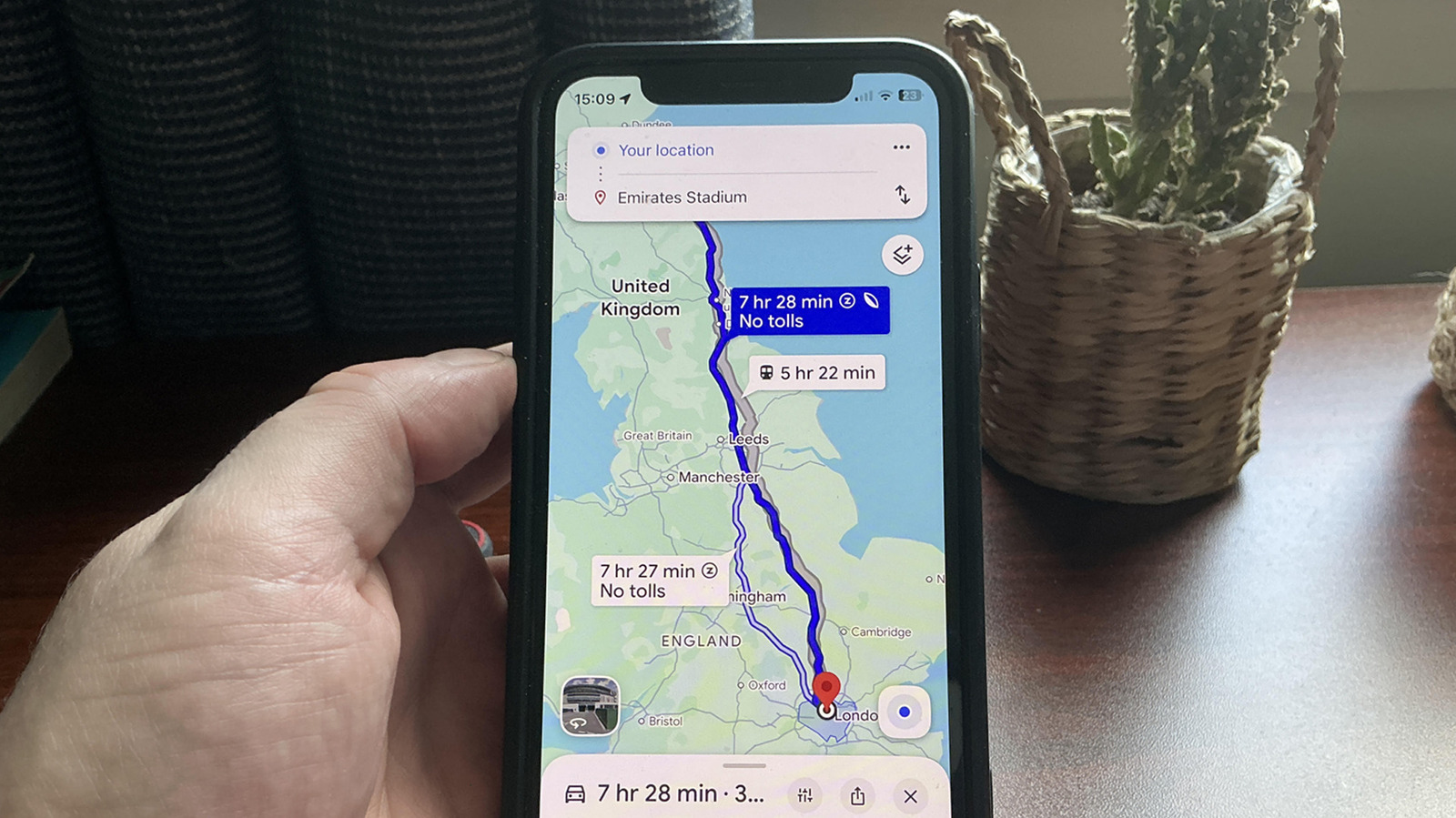
Eco-friendly routes are worth checking out, but there are a few things to know before you do.
If you’ve ever wondered what the leaf symbol in Google Maps means, you’re not alone. Google doesn’t exactly scream about this icon from the rooftops, even though it’s actually one of its navigation app’s more useful features. In short, that little leaf is highlighting a fuel-efficient route. Not only should these routes save you gas or battery charge (they cover both petrol vehicles and EVs), they’re also designed to be more eco-friendly. Or that’s the theory at least. In practice, getting the most out of this Google Maps feature isn’t entirely straightforward, as they can add time to your journeys.
Fuel-efficient routes are enabled by default in Google Maps. If you’re particularly eco-conscious, click on the route with the leaf next to it when planning a trip. The trouble is, these routes don’t always prioritize total travel time, so they can sometimes take longer than less efficient alternatives. If every second counts for that next crucial car ride, you should consider disabling this feature. You can do so by going to Settings > Navigation, before turning off the slider for Prefer fuel-efficient routes. With that said, there are both pros and cons to going with a fuel-efficient route on Google Maps. Let’s get into how these eco routes work.
How does Google Maps determine fuel-efficient routes?

Google Maps pulls live traffic data to predict where congestion levels could build up, among other factors. It also considers different road types, junctions and road layouts, while even taking topography into account. That last one might seem like overkill, but charting a flatter route to your destination can actually save a good deal of energy. After all, driving up a hill requires more power than smoothly cruising along an even highway.
In general, Google Maps strives to strike the right balance between judging the benefits of driving on motorways compared to alternative routes. A journey that largely encompasses freeway driving could offer greater fuel efficiency thanks to more consistent cruising speeds compared to a route peppered with stop signs. On the flip side, a route that avoids major roads might be less prone to congestion, yet it may also involve more stops thanks to lights and roundabouts.
What frustrates some Google Maps users is that fuel-efficient routes can take more time than journeys that don’t take energy consumption into account. Though the gap between ride times shouldn’t be too large thanks to the app’s filtering process, there’s no guarantee that a more eco-friendly ride won’t cause you delays.
The drawbacks of fuel-efficient routes

Google Maps will sometimes ignore motorways on a fuel-efficient route in favor of roads that may provide steadier speeds, which can cause issues. While avoiding congested traffic on highways is favorable in many circumstances, you might suddenly find yourself driving down narrow lanes or awkward areas punctuated by stop signs. Motorists who are less sure of themselves on country roads should also consider disabling fuel-efficient routes if they prefer more consistent motorway driving.
Aside from occasionally being slower than less planet-friendly alternatives, fuel-efficient routes on Google Maps don’t factor in the comfort of a journey. Again, many drivers may prefer avoiding the sort of criss-crossing paths Google Maps can throw up. In instances of severe weather or if you’re traveling through an area that’s completely unknown to you, disabling fuel-efficient routes may be more sensible.
To get the most out of fuel-efficient routes, tweak this one setting

If you’re determined to use full-efficient routes in Google Maps, there’s one crucial setting you should enable. To give Google the best chance of charting the most fuel-efficient route, it’s important you provide specifics relating to your vehicle’s engine type. You can do this by going to Settings > Your vehicles, then selecting either petrol, diesel, hybrid or electric between the engine types.
Giving Google Maps this extra detail should ensure the routes it suggests for you are just a little more efficient. Though seeing as this is the only metric you can supply the app with, and not your vehicle’s weight, engine size or tyre type, there’s only so much detailing the fuel you use is going to help with cutting down on journey times.
Google Maps is one of the best travel apps we can’t leave home without, no question. As much as it’s the go to navigation app for most Android and iOS users, it’s certainly not flawless. Offering fuel-efficient routes by default is definitely commendable in a world still dominated by fossil fuels. Yet this eco-friendly feature has its quirks, which means there are times where disabling it might make more sense for your future journeys.