




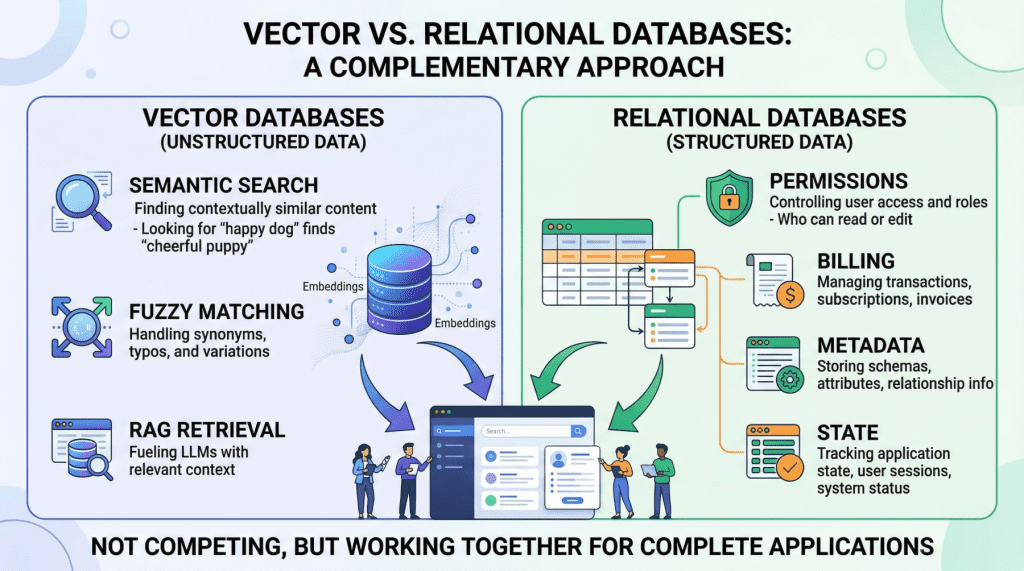
In this article, you will learn why production AI applications need both a vector database for semantic retrieval and a relational database for structured, transactional workloads.
Topics we will cover include:
- What vector databases do well, and where they fall short in production AI systems.
- Why relational databases remain essential for permissions, metadata, billing, and application state.
- How hybrid architectures, including the use of
pgvector, combine both approaches into a practical data layer.
Keep reading for all the details.
Beyond the Vector Store: Building the Full Data Layer for AI Applications
Image by Author
Introduction
If you look at the architecture diagram of almost any AI startup today, you will see a large language model (LLM) connected to a vector store. Vector databases have become so closely associated with modern AI that it is easy to treat them as the entire data layer, the one database you need to power a generative AI product.
But once you move beyond a proof-of-concept chatbot and start building something that handles real users, real permissions, and real money, a vector database alone is not enough. Production AI applications need two complementary data engines working in lockstep: a vector database for semantic retrieval, and a relational database for everything else.
This is not a controversial claim once you examine what each system actually does — though it is often overlooked. Vector databases like Pinecone, Milvus, or Weaviate excel at finding data based on meaning and intent, using high-dimensional embeddings to perform rapid semantic search. Relational databases like PostgreSQL or MySQL manage structured data with SQL, providing deterministic queries, complex filtering, and strict ACID guarantees that vector stores lack by design. They serve entirely different functions, and a robust AI application depends on both.
In this article, we will explore the specific strengths and limitations of each database type in the context of AI applications, then walk through practical hybrid architectures that combine them into a unified, production-grade data layer.
Vector Databases: What They Do Well and Where They Break Down
Vector databases power the retrieval step in retrieval augmented generation (RAG), the pattern that lets you feed specific, proprietary context to a language model to reduce hallucinations. When a user queries your AI agent, the application embeds that query into a high-dimensional vector and searches for the most semantically similar content in your corpus.
The key advantage here is meaning-based retrieval. Consider a legal AI agent where a user asks about “tenant rights regarding mold and unsafe living conditions.” A vector search will surface relevant passages from digitized lease agreements even if those documents never use the phrase “unsafe living conditions”; perhaps they reference “habitability standards” or “landlord maintenance obligations” instead. This works because embeddings capture conceptual similarity rather than just string matches. Vector databases handle typos, paraphrasing, and implicit context gracefully, which makes them ideal for searching the messy, unstructured data of the real world.
However, the same probabilistic mechanism that makes semantic search flexible also makes it imprecise, creating serious problems for operational workloads.
Vector databases cannot guarantee correctness for structured lookups. If you need to retrieve all support tickets created by user ID user_4242 between January 1st and January 31st, a vector similarity search is the wrong tool. It will return results that are semantically similar to your query, but it cannot guarantee that every matching record is included or that every returned record actually meets your criteria. A SQL WHERE clause can.
Aggregation is impractical. Counting active user sessions, summing API token usage for billing, computing average response times by customer tier — these operations are trivial in SQL and either impossible or wildly inefficient with vector embeddings alone.
State management does not fit the model. Conditionally updating a user profile field, toggling a feature flag, recording that a conversation has been archived — these are transactional writes against structured data. Vector databases are optimized for insert-and-search workloads, not for the read-modify-write cycles that application state demands.
If your AI application does anything beyond answering questions about a static document corpus (i.e. if it has users, billing, permissions, or any concept of application state), you need a relational database to handle those responsibilities.
Relational Databases: The Operational Backbone
The relational database manages every “hard fact” in your AI system. In practice, this means it is responsible for several critical domains.
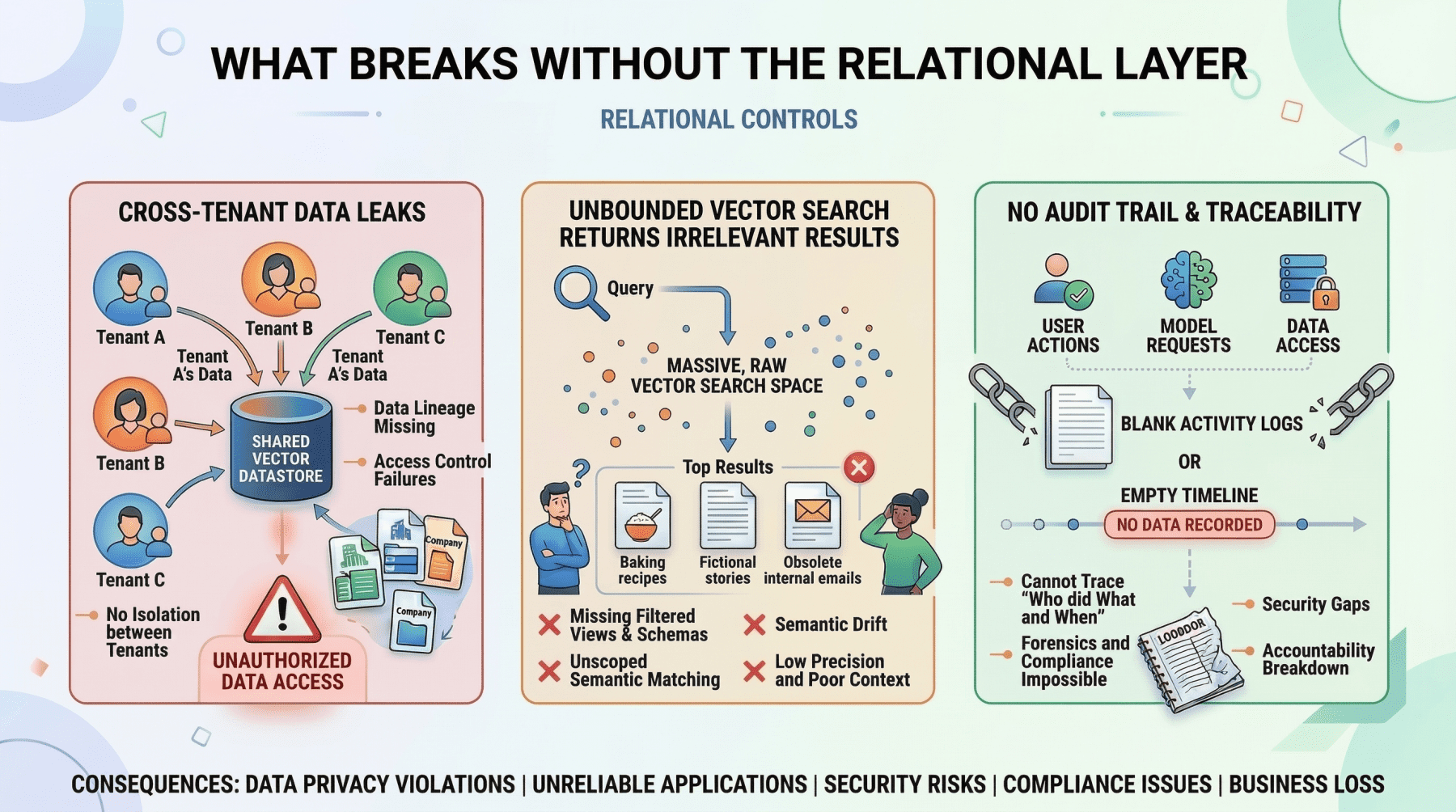
User identity and access control. Authentication, role-based access control (RBAC) permissions, and multi-tenant boundaries must be enforced with absolute precision. If your AI agent decides which internal documents a user can read and summarize, those permissions need to be retrieved with 100% accuracy. You cannot rely on approximate nearest neighbor search to determine whether a junior analyst is authorized to view a confidential financial report. This is a binary yes-or-no question, and the relational database answers it definitively.
Metadata for your embeddings. This is a point that is frequently overlooked. If your vector database stores the semantic representation of a chunked PDF document, you still need to store the document’s original URL, the author ID, the upload timestamp, the file hash, and the departmental access restrictions that govern who can retrieve it. That “something” is almost always a relational table. The metadata layer connects your semantic index to the real world.
Pre-filtering context to reduce hallucinations. One of the most mechanically effective ways to prevent an LLM from hallucinating is to ensure it only reasons over precisely scoped, factual context. If an AI project management agent needs to generate a summary of “all high-priority tickets resolved in the last 7 days for the frontend team,” the system must first use exact SQL filtering to isolate those specific tickets before feeding their unstructured text content into the model. The relational query strips out irrelevant data so the LLM never sees it. This is cheaper, faster, and more reliable than relying on vector search alone to return a perfectly scoped result set.
Billing, audit logs, and compliance. Any enterprise deployment requires a transactionally consistent record of what happened, when, and who authorized it. These are not semantic questions; they are structured data problems, and relational databases solve them with decades of battle-tested reliability.
What Breaks Without The Relational Layer
Image by Author
The limitation of relational databases in the AI era is straightforward: they have no native understanding of semantic meaning. Searching for conceptually similar passages across millions of rows of raw text using SQL is computationally expensive and produces poor results. This is precisely the gap that vector databases fill.
The Hybrid Architecture: Putting It Together
The most effective AI applications treat these two database types as complementary layers within a single system. The vector database handles semantic retrieval. The relational database handles everything else. And critically, they talk to each other.
The Pre-Filter Pattern
The most common hybrid pattern is to use SQL to scope the search space before executing a vector query. Here is a concrete example of how this works in practice.
Imagine a multi-tenant customer support AI. A user at Company A asks: “What’s our policy on refunds for enterprise contracts?” The application needs to:
- Query the relational database to retrieve the tenant ID for Company A, confirm the user’s role has permission to access policy documents, and fetch the document IDs of all active policy documents belonging to that tenant.
- Query the vector database with the user’s question, but constrained to only search within the document IDs returned by step one.
- Pass the retrieved passages to the LLM along with the user’s question.
Without step one, the vector search might return semantically relevant passages from Company B’s policy documents, or from Company A documents that they do not have permission to access. Either case leads to a data leak. The relational pre-filter is not optional; it is a security boundary.
The Post-Retrieval Enrichment Pattern
The reverse pattern is also common. After a vector search returns semantically relevant chunks, the application queries the relational database to enrich those results with structured metadata before presenting them to the user or feeding them to the LLM.
For example, an internal knowledge base agent might retrieve the three most relevant document passages via vector search, then join against a relational table to attach the author name, the last-updated timestamp, and the document’s confidence rating. The LLM can then use this metadata to qualify its response: “According to the Q3 security policy (last updated October 12th, authored by the compliance team)…”
Unified Storage with pgvector
For many teams, running two separate database systems introduces operational complexity that is hard to justify, especially at a moderate scale. This is where pgvector, the vector similarity extension for PostgreSQL, becomes a compelling option.
With pgvector, you store embeddings as a column directly alongside your structured relational data. A single query can combine exact SQL filters, joins, and vector similarity search in one atomic operation. For instance:
|
SELECT d.title, d.author, d.updated_at, d.content_chunk, 1 – (d.embedding <=> query_embedding) AS similarity FROM documents d JOIN user_permissions p ON p.department_id = d.department_id WHERE p.user_id = ‘user_98765’ AND d.status = ‘published’ AND d.updated_at > NOW() – INTERVAL ’90 days’ ORDER BY d.embedding <=> query_embedding LIMIT 10; |
Within one transaction, with no synchronization between separate systems, this single query:
- enforces user permissions
- filters by document status and recency
- ranks by semantic similarity
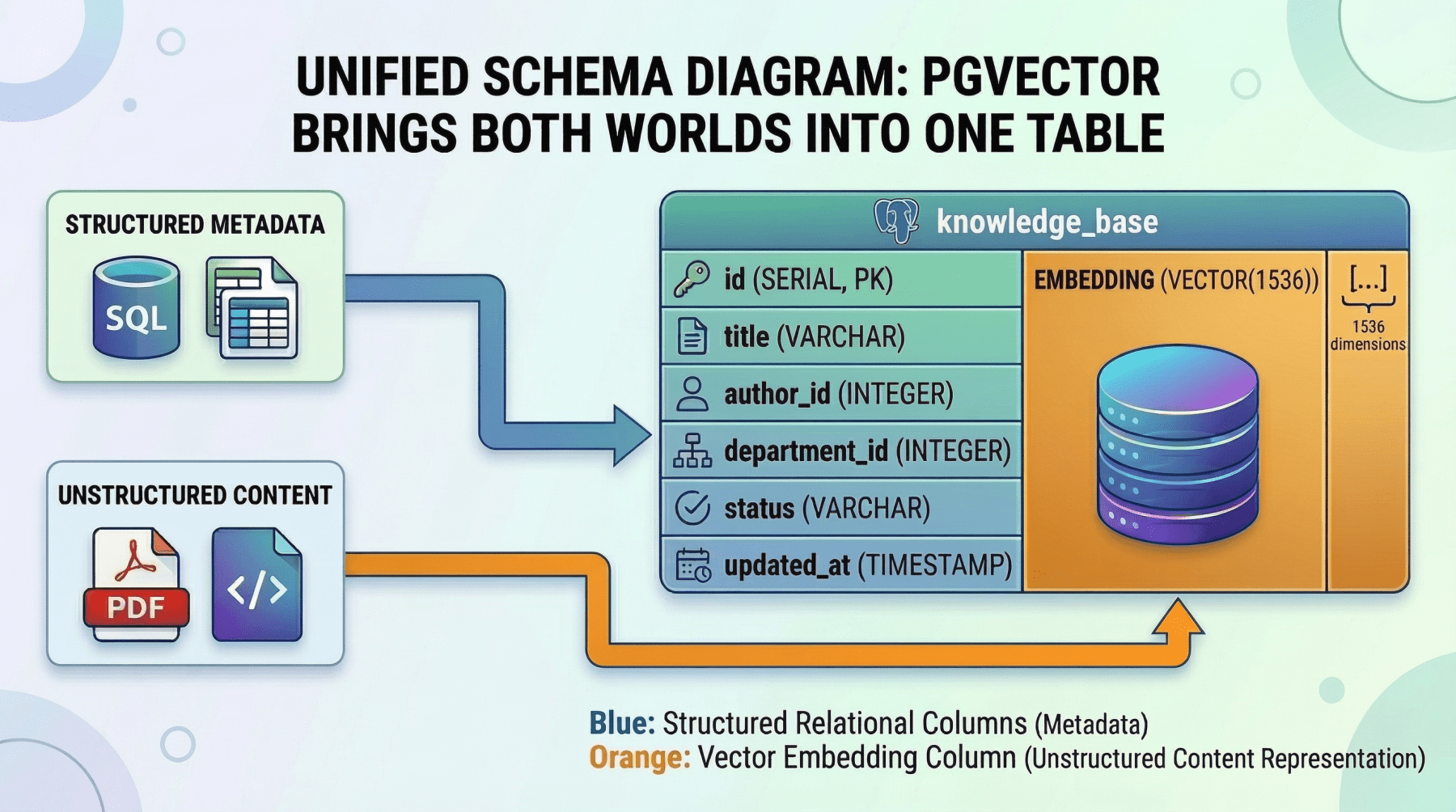
Unified Schema Diagram: Pgvector Brings Both Worlds Into One Table
Image by Author
The tradeoff is performance at scale. Dedicated vector databases like Pinecone or Milvus are purpose-built for approximate nearest neighbor (ANN) search across billions of vectors and will outperform pgvector at that scale. But for applications with corpora in the hundreds of thousands to low millions of vectors, pgvector eliminates an entire category of infrastructure complexity. For many teams, it is the right starting point, with the option to migrate the vector workload to a dedicated store later if scale demands it.
Choosing Your Approach
The decision framework is relatively simple:
- If your corpus is small to moderate and your team values operational simplicity, start with PostgreSQL and
pgvector. You get a single database, a single deployment, and a single consistency model. - If you are operating at a massive scale (billions of vectors), need sub-millisecond ANN latency, or require specialized vector indexing features, use a dedicated vector database alongside your relational system, connected by the pre-filter and enrichment patterns described above.
In either case, the relational layer is non-negotiable. It manages your users, permissions, metadata, billing, and application state. The only question is whether the vector layer lives inside it or beside it.
Conclusion
Vector databases are a critical component of any AI system that relies on RAG. They enable your application to search by meaning rather than by keyword, which is foundational to making generative AI useful in practice.
But they are only half of the data layer. The relational database is what makes the surrounding application actually work; it enforces permissions, manages state, provides transactional consistency, and supplies the structured metadata that connects your semantic index to the real world.
If you are building a production AI application, it would be a mistake to treat these as competing choices. Start with a solid relational foundation to manage your users, permissions, and system state. Then integrate vector storage precisely where semantic retrieval is technically necessary, either as a dedicated external service or, for many workloads, as a pgvector column sitting right next to the structured data it relates to.
The most resilient AI architectures are not the ones that bet everything on the newest technology. They are the ones who use each tool exactly where it is strongest.