




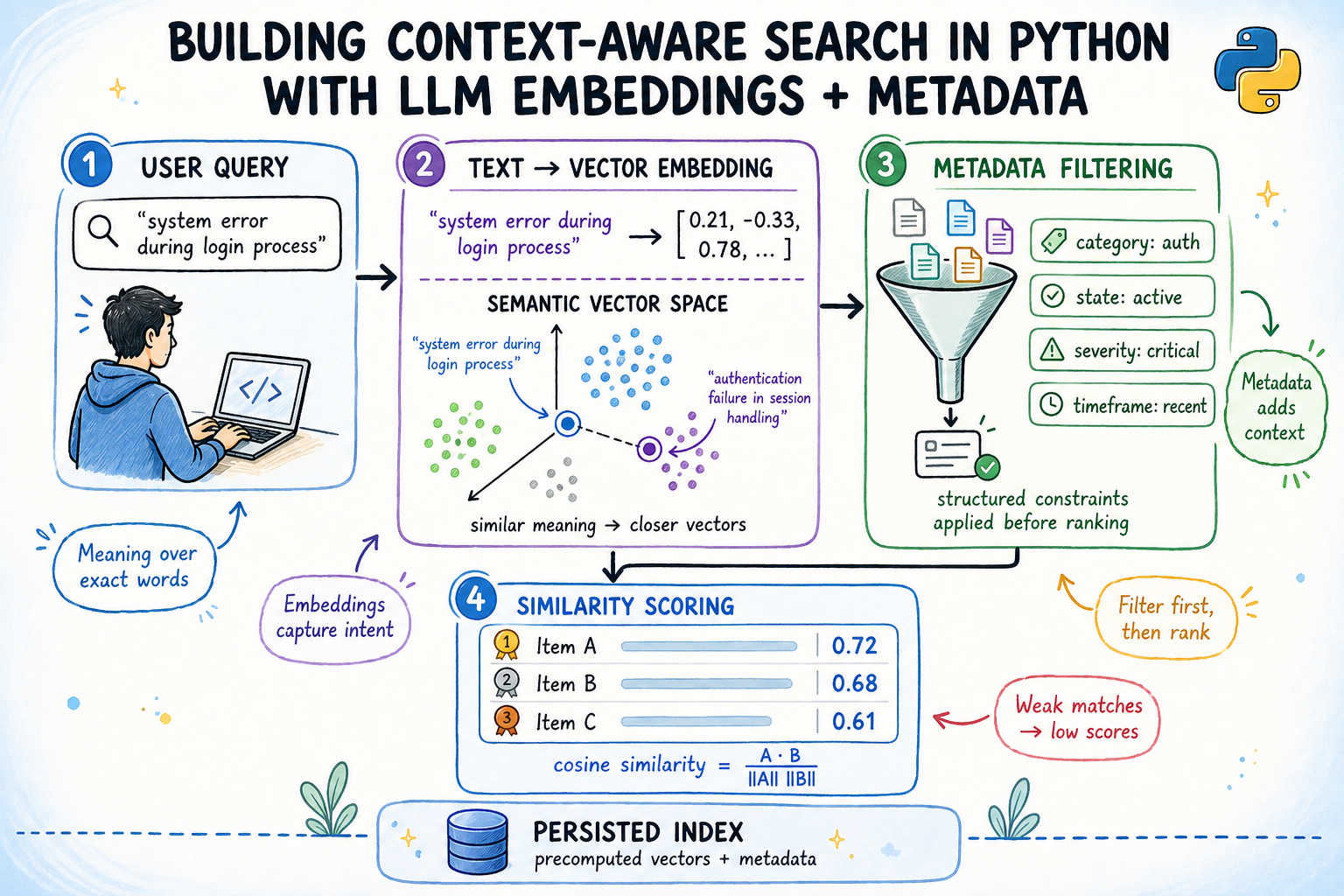
In this article, you will learn how to build a context-aware semantic search engine in Python that combines embedding-based similarity with structured metadata filtering.
Topics we will cover include:
- How sentence embeddings and cosine similarity work together to find semantically relevant documents.
- How to build a metadata-aware search index that filters by team, status, priority, and date before scoring candidates.
- How to persist the index to disk so embeddings are computed only once and reloaded efficiently on subsequent runs.
Building Context-Aware Search in Python with LLM Embeddings + Metadata
Introduction
Keyword search breaks the moment a user types something a document doesn’t literally say. A support engineer searching for “login keeps failing” won’t find a ticket titled “OAuth2 token refresh race condition”, even though that’s exactly what they need. This is the core problem that context-aware semantic search aims to solve.
Semantic search solves this by converting text into dense vector representations called embeddings, where meaning determines proximity rather than exact word overlap. Layer structured metadata filters on top — by date, status, team, priority — and you get a system that understands what someone is asking while respecting contextual constraints at the same time.
This article walks through building that system end-to-end: embeddings from a local pretrained model, a metadata-aware index, cosine similarity ranking, and an index that persists across restarts without requiring re-encoding.
You can get the code on GitHub.
What You Will Build
A simple context-aware search engine over a corpus of engineering support tickets. By the end you will have:
- 384-dimensional embeddings generated locally from a pretrained model, no API key required
- A search index that filters by team, status, priority, and date before scoring
- Cosine similarity ranking over the filtered candidate pool
- A persisted index that reloads without re-encoding
Prerequisites: Python 3.8+, basic familiarity with NumPy and working with lists of dictionaries.
Install dependencies:
|
pip install sentence–transformers numpy |
Understanding How Semantic Search Works
A sentence embedding model takes a string and returns a fixed-length vector of floating-point numbers. The model is trained so that sentences with similar meanings produce vectors pointing in similar directions in high-dimensional space.
Cosine similarity measures the angle between two vectors:
\[
\text{cosine similarity}(A, B) =
\frac{A \cdot B}{\|A\| \, \|B\|}
\]
When vectors are unit-normalized — meaning their length equals 1.0 — this simplifies to the dot product: A · B. Scores range from -1 (opposite) to 1 (identical). In practice, unrelated documents score around 0.1–0.25, and strong matches score above 0.6.
So why does metadata filtering matter? Embedding models encode semantic content. They do not encode who wrote a document, what team owns it, or when it was created. These attributes live outside the text and must be handled separately. Combining both signals — semantic score and metadata constraints — is what makes search useful in real systems.
Setting Up the Dataset
We’ll work with 20 engineering support tickets across three teams — infrastructure, backend, and frontend — with four priority levels, two statuses, and a two-month date window.
Each ticket is a plain dictionary. The text field is what gets embedded; everything else is metadata for filtering.
To keep things concise, a truncated list is shown here instead of the full code block. The complete set of tickets is available in this GitHub gist.
|
1 2 3 4 5 6 7 8 9 10 11 12 13 14 15 16 17 18 19 20 21 22 23 24 25 |
from datetime import date
tickets = [ {“id”: “T-101”, “team”: “infrastructure”, “status”: “open”, “priority”: “high”, “created”: date(2025, 11, 3), “text”: “Kubernetes pod keeps crashing with OOMKilled — memory limits on the ML inference container are set too low for the model it loads at runtime.”},
{“id”: “T-102”, “team”: “infrastructure”, “status”: “open”, “priority”: “high”, “created”: date(2025, 11, 8), “text”: “Nginx ingress returning 502 after rotating TLS certificate. Chain is valid per openssl verify but the backend handshake fails immediately.”},
{“id”: “T-103”, “team”: “infrastructure”, “status”: “resolved”, “priority”: “medium”, “created”: date(2025, 10, 14), “text”: “Terraform state file locked in S3 — a team member force-applied a plan without releasing the DynamoDB lock first.”},
...
{“id”: “T-401”, “team”: “infrastructure”, “status”: “open”, “priority”: “medium”, “created”: date(2025, 11, 11), “text”: “CI pipeline fails on ARM64 runners — base Docker image has no ARM variant, exec format error at build stage.”},
{“id”: “T-402”, “team”: “infrastructure”, “status”: “resolved”, “priority”: “high”, “created”: date(2025, 10, 9), “text”: “VPN gateway latency spikes at peak hours — BGP route flapping between two peers causing intermittent packet loss across the private subnet.”}, ] |
A quick check on the shape of the corpus before moving on:
|
open_ct = sum(1 for t in tickets if t[“status”] == “open”) resolved_ct = sum(1 for t in tickets if t[“status”] == “resolved”) print(f“{len(tickets)} tickets | {open_ct} open | {resolved_ct} resolved”) |
Output:
|
20 tickets | 14 open | 6 resolved |
Running the snippet confirms the distribution: 20 tickets total, 14 open and 6 resolved, spread across the three teams.
Step 1: Generating Embeddings
all-MiniLM-L6-v2 maps any sentence to a 384-dimensional vector. It runs entirely on CPU, downloads once from Hugging Face (~22 MB), is cached locally after that, and requires no API key.
|
from sentence_transformers import SentenceTransformer import numpy as np
model = SentenceTransformer(“all-MiniLM-L6-v2”)
texts = [t[“text”] for t in tickets] embeddings = model.encode(texts, normalize_embeddings=True, show_progress_bar=True)
print(f“Shape: {embeddings.shape} | norm[0]: {np.linalg.norm(embeddings[0]):.4f}”) |
We pass normalize_embeddings=True so each output vector comes out with L2 norm exactly 1.0. Once vectors sit on the unit hypersphere, cosine similarity between any two of them is just their dot product, so no division is needed at query time. That means scoring the entire candidate pool reduces to a single matrix multiplication.
Output:
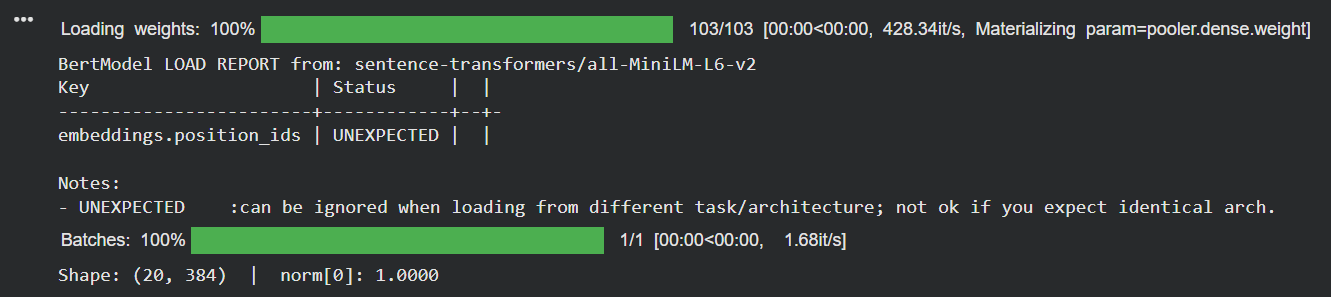
Sentence Embeddings for 20 Tickets
We get back a (20, 384) float32 matrix — one row per ticket. The norm of 1.0 confirms the normalization worked.
Step 2: Building the Index
The index stores the embedding matrix alongside the associated metadata and exposes a search method that accepts optional keyword arguments for every metadata field.
|
1 2 3 4 5 6 7 8 9 10 11 12 13 14 15 16 17 18 19 20 21 22 23 24 25 26 27 28 29 30 31 32 33 34 35 36 37 38 39 40 41 42 43 44 45 46 47 48 49 50 51 |
class ContextAwareIndex: def __init__(self, embeddings: np.ndarray, documents: list): self.embeddings = embeddings # (N, D), L2-normalized self.documents = documents
def search( self, query: str, top_k: int = 5, team: str = None, status: str = None, priority: str = None, after: “date” = None, before: “date” = None, min_score: float = 0.0, ) -> list[dict]:
# Embed the query into the same vector space as the documents q_vec = model.encode([query], normalize_embeddings=True)[0]
# Build a boolean mask — False for any document that fails a filter condition mask = np.ones(len(self.documents), dtype=bool) for i, doc in enumerate(self.documents): if team and doc[“team”] != team: mask[i] = False if status and doc[“status”] != status: mask[i] = False if priority and doc[“priority”] != priority: mask[i] = False if after and doc[“created”] < after: mask[i] = False if before and doc[“created”] > before: mask[i] = False
candidate_idx = np.where(mask)[0] if len(candidate_idx) == 0: return []
# Score only the candidates that passed the filter scores = self.embeddings[candidate_idx] @ q_vec
# Drop anything below the minimum score threshold, sort, return top-k valid = np.where(scores >= min_score)[0] if len(valid) == 0: return []
top_local = np.argsort(scores[valid])[::–1][:top_k] top_global = candidate_idx[valid[top_local]]
return [ {**self.documents[i], “score”: float(scores[valid[top_local[j]]])} for j, i in enumerate(top_global) ]
index = ContextAwareIndex(embeddings, tickets) |
The key design decision here is filtering before scoring, not after. Post-hoc filtering wastes dot-product compute on documents you’d discard anyway. Filtering first also ensures min_score can drop irrelevant results instead of returning noisy low-confidence matches.
Step 3: Running Queries
We’ll run three queries to show different aspects of the system: semantic search alone, the same query with metadata filters, and a cross-team query scoped by priority.
First, a small helper that formats results consistently across all three examples.
Query 1: Searching Without Filters
To establish a baseline, we search without any metadata constraints, letting the embedding model rank the full corpus on semantic similarity alone.
|
results = index.search(“authentication token expiry and session management”, top_k=4) show(“‘authentication token expiry and session management’ (no filters)”, results) |
Running this against the full 20-ticket corpus returns the following four backend tickets:
|
Query: ‘authentication token expiry and session management’ (no filters) [0.6133] T–207 backend open high 2025–11–03 Session cookie persists after logout — token blacklist check is missing from the midd... [0.4958] T–201 backend open high 2025–11–05 OAuth2 token refresh fails intermittently — race condition in the token cache where t... [0.3459] T–203 backend open medium 2025–11–01 JWT signature verification fails intermittently — clock skew of 4 seconds between the... [0.1714] T–206 backend open high 2025–11–13 Rate limiting not scoping per user — middleware uses a shared Redis key derived from ... |
Query 2: Filtering by Status and Date
The query text is identical to the previous one. What changes is the candidate pool: this time we restrict to open tickets created before November 10th, 2025, simulating a workflow where a team wants only unresolved issues within a certain window.
|
results = index.search( “authentication token expiry and session management”, top_k=4, status=“open”, before=date(2025, 11, 10), ) show(“same query [status=open, before=2025-11-10]”, results) |
Output:
|
Query: same query [status=open, before=2025–11–10] [0.6133] T–207 backend open high 2025–11–03 Session cookie persists after logout — token blacklist check is missing from the midd... [0.4958] T–201 backend open high 2025–11–05 OAuth2 token refresh fails intermittently — race condition in the token cache where t... [0.3459] T–203 backend open medium 2025–11–01 JWT signature verification fails intermittently — clock skew of 4 seconds between the... [0.1419] T–202 backend open high 2025–11–09 Database connection pool exhausted under load — pool capped at 20 connections but the... |
Query 3: Searching Across Teams with a Priority Filter
Resource exhaustion appears in both infrastructure and backend tickets; they share semantic territory regardless of team ownership. This query tests whether the model groups them correctly across that boundary.
|
results = index.search( “resource exhaustion and memory pressure under load”, top_k=2, status=“open”, priority=“high”, ) show(“‘resource exhaustion and memory pressure’ [status=open, priority=high]”, results) |
This outputs:
|
Query: ‘resource exhaustion and memory pressure’ [status=open, priority=high] [0.3877] T–202 backend open high 2025–11–09 Database connection pool exhausted under load — pool capped at 20 connections but the... [0.2908] T–101 infrastructure open high 2025–11–03 Kubernetes pod keeps crashing with OOMKilled — memory limits on the ML inference cont... |
Step 4: Persisting the Index
Re-encoding the corpus on every startup defeats the purpose of building an index. The right pattern is to encode once, save the embedding matrix and metadata to disk, and reload them on subsequent runs.
|
import json
# Write the embedding matrix and ticket metadata to disk np.save(“ticket_embeddings.npy”, embeddings)
with open(“ticket_metadata.json”, “w”) as f: json.dump( [{**t, “created”: t[“created”].isoformat()} for t in tickets], f, indent=2, ) |
The embedding matrix saves as a binary .npy file. Metadata saves as JSON, but Python’s date objects must be converted to ISO strings first. When starting a new session, the loading process works in two stages:
Model loading (from cache): The SentenceTransformer model first checks your local cache (e.g. .cache/huggingface/hub/). If the model is already available there, it loads immediately. Otherwise, it downloads the model once from Hugging Face and stores it locally to avoid repeated downloads in the future.
Index reloading (from saved data): The saved ticket embeddings (ticket_embeddings.npy) and metadata (ticket_metadata.json) are loaded from disk. This allows the ContextAwareIndex to be rebuilt instantly without recomputing embeddings, saving both time and compute.
|
1 2 3 4 5 6 7 8 9 10 11 12 13 14 15 16 17 |
from datetime import date import json import numpy as np from sentence_transformers import SentenceTransformer
# Restore the embedding matrix, deserialize the metadata, rebuild the index embeddings_loaded = np.load(“ticket_embeddings.npy”)
with open(“ticket_metadata.json”) as f: tickets_loaded = json.load(f) for t in tickets_loaded: t[“created”] = date.fromisoformat(t[“created”])
model = SentenceTransformer(“all-MiniLM-L6-v2”) index = ContextAwareIndex(embeddings_loaded, tickets_loaded)
print(f“Reloaded: {embeddings_loaded.shape[0]} docs, {embeddings_loaded.shape[1]}D.”) |
The encoding step runs once. Every subsequent startup is two file reads and one model load from cache.
Summary
Context-aware semantic search combines an embedding model to convert text into vectors, normalization to align cosine similarity with dot products, a metadata mask to restrict candidates before scoring, and a ranking step that orders results by similarity.
Here’s what you can do next:
- Add new documents: Encode with
model.encode, stack withnp.vstack, append metadata — no re-indexing needed. - Multi-value metadata filters: Store teams as a list of strings and check
doc["team"]against the list. - Scale beyond 100k documents: Replace brute-force scoring with an approximate nearest neighbor index like FAISS and keep the metadata pre-filter unchanged.
- Hybrid scoring: Combine semantic and keyword signals with a weighted mix.
Happy building!